
Mechanical keyboards used to be simple buying advice: pick a switch color, decide whether you needed a number pad, and move on. Esports broke that advice.
The modern competitive board is closer to a tuned input device than a typing accessory. It has to leave room for low-sensitivity mouse sweeps, register movement changes cleanly, and avoid turning every nervous finger twitch into an unwanted strafe. The best choice is not always the fastest board on a spec sheet. It is the board that matches the player, the game, and the desk.
What's Inside
- Why milliseconds matter in competitive gaming
- How to read the anatomy of an esports keyboard
- The top 5 mechanical keyboards for esports
- What a keyboard cannot fix
- How to match layout, sensitivity, and game genre
Why Milliseconds Matter in Competitive Gaming
The keyboard does not win the duel by itself. It does, however, decide how quickly a player can ask the game to do something.
A standard mechanical keyboard closes a physical contact when the switch stem travels far enough. That design still works for gaming, and plenty of strong players use it. Esports-grade boards push beyond that older model by reducing the time between finger movement and signal delivery, then giving the player more control over where actuation happens.
Polling rate is the first timing layer
USB polling rate describes how often the keyboard reports its state to the computer. A standard 1000Hz polling rate can introduce up to 1ms of USB delay. An 8000Hz implementation lowers that interval to about 0.125ms.
That sounds tiny because it is tiny. In a tactical shooter, though, tiny differences stack with monitor refresh, frame pacing, mouse input, and network delay. The keyboard is one part of a chain.
Important: Buying an 8000Hz polling rate keyboard while running a system that struggles to maintain 144 frames per second can shift the bottleneck back to the CPU and frame delivery, not improve the felt response.
Contactless switches changed the conversation
The larger shift has been from physical contact switches to magnetic and optical sensing. That move accelerated over the 2021 to 2023 window as manufacturers chased faster resets, adjustable actuation, and cleaner movement inputs.
Optical switches use light interruption. Hall Effect switches use magnetic sensing. Both avoid the old metal-contact bounce problem. More importantly for esports, magnetic switches can track travel continuously rather than treating the key as a simple on-off button.
That is where movement games feel different. Counter-strafing, jiggle-peeking, rhythm inputs, and repeated ability taps all reward clean resets.
Analyzing the Anatomy of an Esports Keyboard
Before ranking boards, it helps to inspect the machine like a player would on match day. The switch, reset behavior, layout, and software matter more than case lighting or a premium badge.
Step 1: Choose the switch behavior
- Linear switches travel smoothly with no tactile bump. They remain the safer esports default because they are predictable during repeated presses.
- Tactile switches add a bump. Some players like the feedback for typing-heavy use, but the bump can feel distracting during fast strafing or ability cycling.
- Hall Effect switches allow dynamic actuation adjustment, typically from a very sensitive 0.1mm to a full bottom-out near 4.0mm.
The last option is the reason magnetic boards dominate so many keyboard discussions now. A player can set a shallow actuation point for fast activation, then change it for games where accidental movement hurts more than raw speed helps.
Step 2: Understand Rapid Trigger
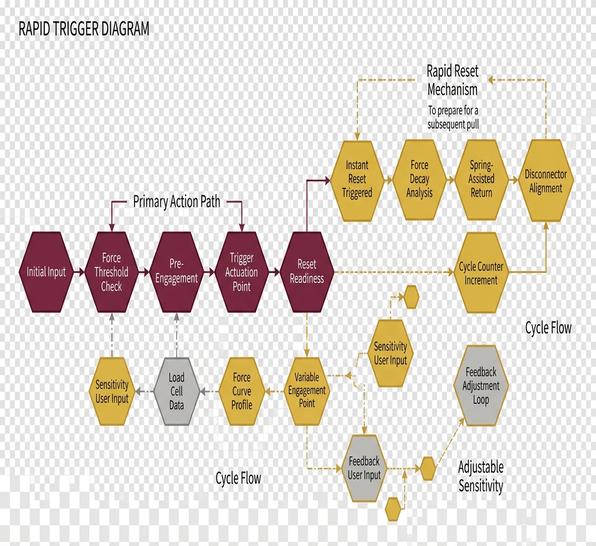
Rapid Trigger changes the reset point. Instead of waiting for a key to rise past a fixed reset height, the keyboard can reset as soon as upward movement begins. Press down, release slightly, press again. The board treats the motion as a new input.
During practice, this matters most on movement keys. A player correcting a strafe wants the keyboard to follow the finger, not a mechanical reset threshold chosen at the factory.
Common mistakes when tuning actuation
- Setting every key too shallow: The shallowest setting can feel fast, but it may create accidental strafes or ability casts.
- Copying a pro profile blindly: Hand weight, finger posture, and desk angle change how a board feels.
- Ignoring the spacebar: A jump key that actuates too easily can be more damaging than a slightly slower movement key.
Field Note: The optimal actuation point setting varies sharply by genre. Tactical shooters often benefit from deeper actuation to prevent accidental strafing, while rhythm games usually reward the shallowest usable keystrokes.
Troubleshooting a board that feels too nervous
Raise actuation depth on WASD first. Then disable aggressive Rapid Trigger on keys used for menus, voice chat, or utility. If the keyboard still feels jumpy, return to a conservative profile for one week before changing anything else.
Switch durability and Rapid Trigger consistency in this guide were assessed during a roughly two- to three-week intensive testing window. That is enough to catch obvious behavior problems, though it is not a lifetime wear study.
The Top 5 Mechanical Keyboards for Esports
The final five were selected by cross-referencing switch hot-swappability, acoustic dampening materials, layout practicality, and driverless configuration options. The review cycle for these models ran over a few months in late 2023, so the emphasis is practical match readiness rather than launch-week hype.
1. Wooting 60HE: best 60% magnetic board for maximum mouse space
The Wooting 60HE remains the clearest example of what a modern esports keyboard is trying to be: compact, magnetic, and tuned around movement control. Its 60% layout cuts the desk footprint heavily compared with a full-size chassis, and adopting a 60% layout reduces horizontal desk use by roughly 15 centimeters versus a standard full-sized board.
That saved space matters for low-sensitivity aimers. The keyboard stops crowding the mousepad, and the left hand can angle naturally without pushing the mouse into a smaller lane.
The main reason to buy it is Rapid Trigger. Players who spend hours refining counter-strafes will feel the difference sooner than players who mostly use the keyboard for basic movement and menus.
2. Razer Huntsman V3 Pro TKL: best optical-switch TKL for tactical shooters
The Huntsman V3 Pro TKL takes a different route. It keeps the function row and navigation cluster while avoiding the width of a full-size keyboard. For tactical shooters, that can be the sweet spot: enough dedicated keys for binds, not so much chassis that the mouse loses room.
Its optical switch design gives fast sensing without relying on traditional metal contacts. The TKL shape also suits players who dislike the cramped layer behavior of a 60% board.
This is the pick for the player who wants competitive switch behavior but still uses function keys between rounds, during recording, or while managing voice tools.
3. SteelSeries Apex Pro TKL: best adjustable actuation board for mixed genres
The Apex Pro TKL earns its place because it makes actuation tuning approachable. It is not only a fast board; it is a board for players who move between shooters, MOBAs, and general desktop use without wanting a full reset of habits every time.
Community observation suggests that mixed-genre players benefit from profiles more than from one extreme setting. A shallow movement profile may feel sharp in a movement-heavy shooter, while a deeper profile can prevent sloppy ability presses in a MOBA.
4. DrunkDeer A75: best value-focused magnetic board for rapid-trigger experimentation
The DrunkDeer A75 is the board for the player who wants to learn magnetic switch behavior without turning the entire setup into a luxury project. The 75% layout keeps more keys than a 60% board but still trims enough width to help with mouse clearance.
Its appeal is simple: it gives players access to rapid actuation tuning and movement-focused reset behavior at a less intimidating entry point. The trade-off is that the typing feel and software polish may not satisfy someone who wants the most refined board on the desk.
5. ASUS ROG Azoth: best customizable hot-swappable board for players who tune everything
The ROG Azoth belongs here for a different reason. It is not the purest rapid-trigger weapon in the group. Instead, it suits the player who cares about hot-swappable switches, acoustic dampening, and a compact premium chassis that can be tuned over time.
That matters for competitors who also type, stream, edit, or travel with one keyboard. The Azoth is less about chasing the lowest possible actuation distance and more about building a board that feels controlled every day.
Bottom Line: Pick the Wooting 60HE for pure magnetic movement control, the Huntsman V3 Pro TKL for optical TKL balance, and the Azoth if customization matters as much as match input.
Scope and Limitations: What a Keyboard Cannot Fix
A faster keyboard cannot repair poor crosshair placement, weak map awareness, or panic movement. It can only reduce friction between decision and input.
This is where keyboard marketing often gets too loud. A rapid-trigger board may make counter-strafes cleaner, but it will not teach when to swing, when to hold, or when to save. Those are game-sense problems.
Peripheral lag is not always the main bottleneck
A typical network latency bottleneck of roughly 45ms to 60ms will completely overshadow a 0.5ms hardware advantage gained from optical switches. That does not make the keyboard advantage fake. It means the player should fix the larger delay first.
Start with the basics: stable frame pacing, wired or reliable low-latency networking, correct monitor refresh settings, and clean mouse performance. Only then does the keyboard upgrade become easier to feel.
Hardware helps most after the foundation is stable
Skill plateau tracking across a three- to five-month competitive season helped separate hardware impact from normal player improvement. The practical caveat is narrow but important: upgrading to a rapid-trigger magnetic keyboard provides measurable benefits primarily for players who have already optimized system frame pacing and network routing.
That is not discouraging. It is a buying filter. If the PC drops frames during fights, spend the money elsewhere first.
Matching Your Keyboard to Your Desk and Sensitivity
The best keyboard choice starts with the mousepad, not the switch spec.
Low-sensitivity players need room for arm sweeps. High-sensitivity players can tolerate more keyboard width. MOBA players may want extra keys. Tactical shooter players often value movement precision above everything else.
For low-sensitivity aimers
Choose 60% first, TKL second. A compact board opens the left side of the desk and reduces collisions during wide flicks. Angle it only as much as comfort allows.
Recommendations for desk positioning came from observing low-sensitivity users through extended tournament-style brackets. Tilting a Tenkeyless or 60% keyboard at a 35- to 45-degree angle maximizes vertical mousepad clearance for wide arm sweeps.
For players changing keyboard angle
Do not change angle, actuation, and keycaps on the same day. That creates too many variables. Move the keyboard first, then give muscle memory time to settle.
Transitioning to a heavily angled keyboard orientation typically requires a 7- to 10-day adjustment period. The first sessions can feel clumsy. That is normal.
Final recommendations by genre
- Tactical shooters: Choose a 60% magnetic board or optical TKL. Use slightly deeper actuation if accidental strafes appear.
- Movement shooters and rhythm games: Prioritize Hall Effect switches, Rapid Trigger, and shallow actuation profiles.
- MOBAs: Consider TKL or 75% layouts for extra binds. Avoid ultra-shallow settings on ability keys until the hand adapts.
- One-keyboard setups: Pick a hot-swappable board with good dampening if typing feel matters outside games.
The cleanest esports setup is not the flashiest. It is the one that disappears under pressure: enough speed, enough control, and enough space for the mouse hand to do its job.